

Facilitator notes
We think about our AI tooling in three big chunks: developer environments, multi-step tasks & running agents, and building your own apps.
This session teaches new ways of working on multi-step tasks - the complex workflows most ripe for AI optimization, not just single-step automation. We focused on training less-technical users to use Rovo CLI, a high-powered AI coworker that operates across your files, tools, and code.
Rovo is one of many AI agent tools out there. We use Rovo because it's built for multi-step, agentic work: automating tasks and coordinating with agents, not just single commands. It started as a tool for software teams, but it's just as useful for PMs, designers, and other knowledge workers handling complex workflows.
Below is the curriculum we ran, just so you can see one way to put this into practice. It'll keep evolving, and yours will look different based on your own organization's tools.
Rovo CLI
Atlassian AI Builders Week curriculum
Take what's relevant and make it your own.
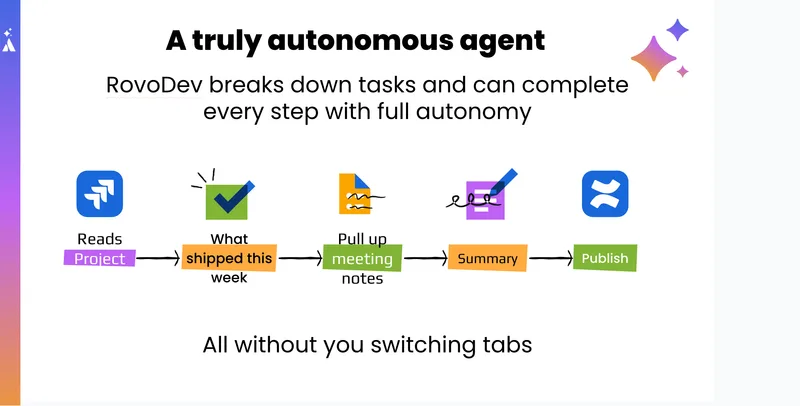
Rovo CLI is a local, terminal-based AI agent that can do more than chat. Unlike a browser-based assistant that mainly summarizes or answers questions, Rovo CLI can work through end-to-end tasks by combining reasoning with tools, files, and execution.
Runs locally
Runs on your computer, so it can read local files, inspect downloaded data, and work with assets on your machine.
Has tool access
Connects to Atlassian tools such as Jira, Confluence, and Loom, plus optional tools like Databricks and Teamwork Graph when configured.
Persistent memory
Maintains memory via text files, so it can remember workflows and improve over time.
Multi-step tasks
Handles larger, multi-step tasks better than typical chat experiences because it can iterate, troubleshoot, and use local execution.
Key insight: Rovo CLI is most valuable when the job is not "answer this question" but "go do this workflow."
Why it is different from standard AI chat tools
The session highlighted a common pattern: many people have tried ChatGPT, Gemini, or chat-style assistants for brainstorming and summarization, but those tools often hit a wall when asked to complete actual work.
Rovo CLI is different because it can:
Access the real tools where work happens.
Read actual files and datasets.
Take on multi-step workflows with intermediate reasoning.
Work with persistent context rather than starting from scratch each time.
What PMs can use Rovo CLI for
The talk framed Rovo CLI as especially useful for repeatable PM workflows that require synthesis, traversal across systems, and content generation.
High-value PM use cases
- Weekly status updates: Assembled from Jira, Confluence, Loom, meetings, and Teamwork Graph activity.
- Product strategy drafting: With iterative questioning and structured outputs.
- Roadmap generation: From strategy documents using prioritization frameworks such as RICE.
- JPD population: Complete ideas, descriptions, and linked strategy context in Jira Product Discovery.
- Prototype generation: From roadmap items or comments on tickets.
- Ad hoc product analysis: Using tools like Databricks for answering operational or product questions.
- Workflow automation by memory: Repeated tasks become progressively easier because the agent remembers how to perform them.
Core capabilities shown in the session
Retrieval across Atlassian tools
Rovo CLI was shown pulling information directly from:
- Confluence pages
- Loom transcripts
- Jira and Jira Product Discovery
- Teamwork Graph relationships
Useful for gathering scattered context before drafting or decision-making.
Local execution
Because Rovo CLI runs on your machine, it can:
- Read downloaded CSVs and files
- Process large datasets
- Write scripts such as Python or shell commands
- Generate files in your working directory
A major unlock for heavier workflows that are difficult in standard chat tools.
Persistent memory
Rovo CLI can remember how you like tasks done. In the demo, this was positioned as a major advantage for repeated PM workflows such as weekly updates. You can ask it to note your edits and improve next time.
Session-based work
Rovo CLI supports multiple sessions, allowing you to keep separate workstreams active and switch back to earlier conversations when needed.
Getting started
Setup overview
Setup takes roughly 10\u201315 minutes and includes:
Install the Atlassian CLI tool.
Add Rovo CLI.
Configure memory.
Add optional tools you care about, such as Databricks or Teamwork Graph access.
Safety note: Rovo CLI is more powerful than a normal chat assistant. It can access your computer and perform real actions. Monitor what it is doing, stop it if needed, and do not let it continue if you do not understand the action being taken.
Basic launch
Rovo CLI is started from Terminal using an Atlassian CLI command:
acli rovodev
Once launched, the interface behaves like a chat with an agent, but with access to tools and local context.
Useful built-in concepts
Sessions
Switch between different work threads.
Memory
Initializes and manages persistent memory in your current directory.
Models
Switch between available AI models.
Recommended working model for PMs
The session suggested a practical pattern for product managers:
Start broad with a goal-oriented prompt.
Let Rovo CLI gather context from relevant tools.
Refine through follow-up rather than expecting the first output to be perfect.
Edit the output yourself where needed.
Tell Rovo CLI what changed so it can remember the workflow and improve.
A strong pattern is: get to 90\u201395% with Rovo CLI, do a human review pass, then teach the agent what you changed so the next run is better.
Demo workflows
Weekly wrap-up
Create a structured weekly summary by pulling together work across meetings, Jira issues, Confluence pages, Loom recordings, and other activity.
Rovo CLI used Teamwork Graph and connected tools to gather the relevant work, synthesize the context, and generate a near-complete weekly update.
Suggested prompt:
It's Friday. I need to write my weekly wrap-up. Pull together everything I worked on this week across meetings, Jira issues, Confluence pages, and Loom recordings, then create a structured summary in my usual reporting format.
Reduces time spent chasing updates. Creates a reusable workflow that improves over time as the agent learns your preferred structure.
Product strategy brainstorming
Use Rovo CLI as an interactive strategic thinking partner. The presenter prompted Rovo CLI with a strategic topic and asked it to first gather clarity by asking structured questions. Rovo CLI then synthesized the answers into a strategy document as a local markdown file.
Useful for early-stage framing when the problem is still fuzzy. Helps surface assumptions you may not have articulated yet.
Best practice: Ask Rovo CLI to question you first before generating the strategy. This leads to better outputs than dumping context and asking for a draft immediately.
Publishing strategy to Confluence
Turn a locally drafted strategy into a team-visible artifact. After creating the strategy, the presenter asked Rovo CLI to publish it to Confluence in a personal space, creating a sharable page for teammate comments.
Closes the loop from ideation to socialization. Enables a feedback loop where Rovo CLI can later consume comments and revise the draft.
Converting strategy into roadmap items
Break a strategy down into candidate roadmap items using a prioritization framework. Rovo CLI was asked to create a set of roadmap items using the RICE framework and write them to a markdown file.
Speeds up the jump from strategy to execution planning. Provides an initial prioritization scaffold.
Creating Jira Product Discovery ideas
Take roadmap concepts and create well-formed ideas in Jira Product Discovery. Rovo CLI interpreted the roadmap file, created JPD work items, populated richer descriptions than a human often would manually, and linked each item back to the source strategy.
Removes repetitive manual entry. Improves completeness and traceability. Creates a tighter chain from strategy to backlog.
Updating ideas from comments
Use stakeholder or self-authored comments to refine a backlog item. The presenter added a comment to a JPD item via dictation, then asked Rovo CLI to read the comment and update the item with that new detail.
Makes asynchronous iteration easier. Supports a more natural way of capturing product thinking. Reduces friction between ideation, feedback, and backlog hygiene.
Turning a backlog item into a prototype
Take a JPD idea and convert it into a working prototype. Rovo CLI fetched the item details from JPD, inspected the prototype code, made code changes, verified the prototype ran correctly, and produced a working UI update.
The demo also showed that Rovo CLI can self-verify by interacting with the local environment and checking whether the implementation behaves as expected.
Key takeaway: This is one of the strongest "product builder" use cases: move from strategy to roadmap to backlog to prototype in one connected workflow.
Tips for prompting effectively
If a task should use Databricks, say so. If a task should use a specific skill, point to it directly. The demo showed that Rovo CLI may otherwise choose a plausible but suboptimal route.
Markdown file for editable artifacts, structured summary for status updates, JSON for machine-readable output, Confluence page when the result should be shared.
Start with the goal, let the agent ask questions, review the draft, give specific corrections, then tell it to remember the updated workflow.
The demo repeatedly showed use of interruption when the agent got stuck or headed down the wrong path. This is normal. Rovo CLI is powerful, but it still benefits from active steering.
Best practices
- Start with repeated workflows rather than one-off novelty use cases.
- Keep outputs reviewable by writing to markdown or Confluence instead of leaving everything in terminal chat.
- Teach through feedback by telling the agent what you changed and why.
- Use local text files as a working surface for drafts, notes, and memory.
- Monitor actions carefully, especially when tool use or local execution is involved.
- Be specific about environment and project context so Rovo CLI does not search in the wrong place.
Common pitfalls
Expecting perfection on the first try
The best results usually come after a few iterations.
Not specifying the right tool
This can send the agent down an unhelpful path.
Forgetting output expectations
Agents tend to be verbose unless told otherwise.
Letting it run unsupervised
Always stay in the loop and understand what it is doing.
Skipping memory setup
This removes one of Rovo CLI's biggest advantages.
Suggested first experiments for PMs
Create your weekly wrap-up workflow and teach it your preferred format.
Draft a product strategy from a set of notes and have it publish to Confluence.
Turn an existing strategy page into a candidate roadmap using RICE.
Push a small set of ideas into Jira Product Discovery with linked context.
Take one idea and try turning it into a rough prototype.
Example prompts to try
Weekly update
Pull together everything I worked on this week across Jira, Confluence, Loom, and meetings, then draft my weekly update in my usual format.
Strategy shaping
Help me brainstorm a strategy for [topic]. Ask me clarifying questions first, then draft a structured strategy document as a markdown file.
Roadmap generation
Take this strategy and create five roadmap items using the RICE framework, then write them to a markdown file.
JPD population
Create Jira Product Discovery ideas from this roadmap, include complete descriptions, and link each one back to the strategy page.
Key takeaways
- Rovo CLI is not just another chat interface; it is a workflow agent with tools, memory, and local execution.
- For PMs, its biggest value is in repeated, cross-system, multi-step work.
- The most compelling use cases shown were weekly reporting, strategy drafting, roadmap generation, JPD population, and prototyping.
- Its effectiveness increases significantly when you steer it actively, specify tools and formats, and teach it through iteration.
- If you can get Rovo CLI to complete a workflow once, you can often turn that into a repeatable personal operating system.