


Tokens & Skills
Atlassian AI Builders Week curriculum
Take what's relevant and make it your own.
Teaching teams how to use tokens and AI efficiently is an important foundational skill. AI isn't free. What follows is our curriculum for how we teach teams to think about using AI efficiently.
What is a token?
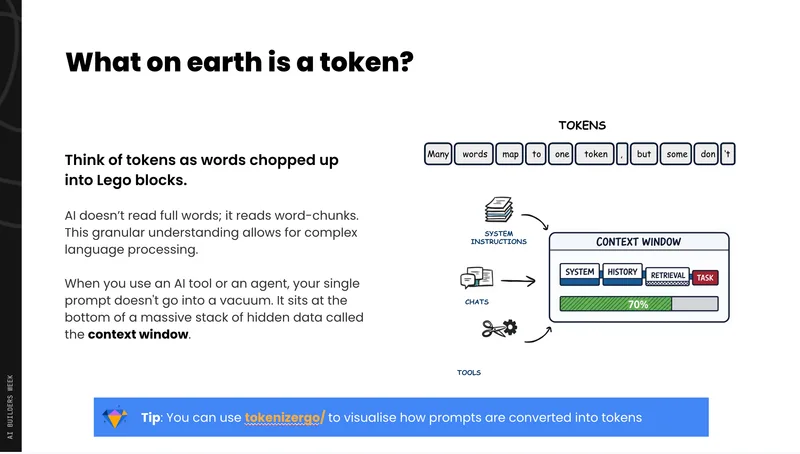
Tokens aren't a direct word-to-word mapping. Punctuation, compound words, and formatting all affect token count. JSON, for example, is token-heavy because every bracket and comma counts. Use a tokenizer tool (such as your model provider's tokenizer) to see exactly how your text converts in real time.
Understanding the context window
The context window is your agent's entire brain for a session — not infinite storage, but a whiteboard.
- Every model call sends the entire conversation from scratch. The model is stateless.
- When the whiteboard fills up, the agent doesn't politely say "I'm not sure" — it hard stops, and the harness starts silently pruning what it thinks is unnecessary. You may lose context you still needed.
- Despite marketing claims, a million-token context window doesn't mean you should use it. Attention mechanisms degrade at scale. At 80–100% context usage, agents forget tasks, skip work, and enter loops.
Practical rule: For execution tasks, stay under 50–70% of your context window. Reserve large contexts for planning and summarization tasks only.
The end-to-end agent loop
Understanding this loop is key to controlling costs:
User input arrives.
Context is assembled — system prompt, loaded skills (name + description of every skill loads every time), conversation history, tool definitions.
Pruning & compacting — the harness trims what it decides to drop before sending to the model.
Model responds — either a tool call or a stop.
Tool call executes on your side (load file, ask question, modify file, etc.).
Results are added back to context, and the loop repeats.
Every loop sends the entire context again. A 200,000-token context running 50 loops costs the same as 10 million tokens. This is where costs blow out.
The four levers for token optimization
Model selection
- Premium models (Opus, GPT-5.5) cost 2–5× more than mid-tier models.
- More capable models can be more efficient — fewer loops, better output — so test before assuming cheaper is better.
- Sonnet is ~50% cheaper than Opus and gets smarter with every release.
- Haiku is ~4× cheaper than Opus and excellent for summarization.
- For designers: Opus is currently the strongest; for everything else, try Sonnet or GPT first.
Input
- Everything going into the model — prompts, tool results, history — costs input tokens.
- Input tokens are cached for 5 minutes; continuing a conversation within that window is ~10× cheaper.
- Keep your context focused on what the agent actually needs.
Loop count
- Every iteration sends the full context — loop count is often the biggest cost driver.
- Instruct agents to run tool calls in parallel where possible (you just have to ask).
- Plan work upfront so the agent isn't exploring on its own.
Output
- Output tokens are typically 5× more expensive than input tokens.
- Don't ask the model to write long-form content unless you need it.
- Be specific and focused about what you want back.
Context management in practice
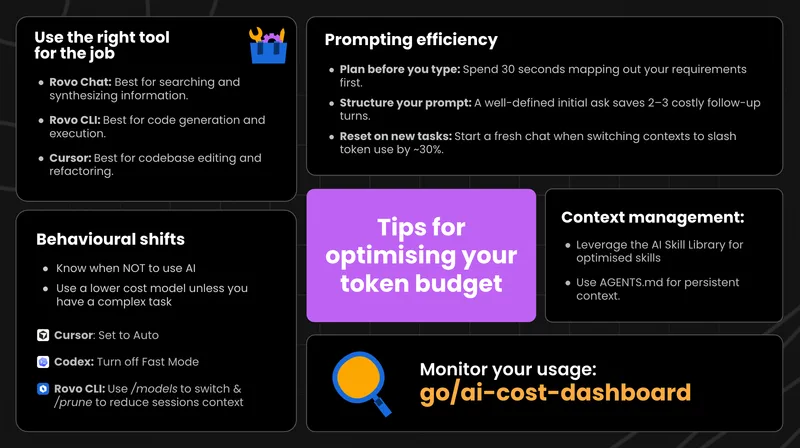
- Split work into batches using sub-agents rather than one long session.
- Keep a project markdown file — record what you're building, current state, and what's next. This lets you break and restart sessions without losing context.
- Start a new session when switching topics (/new in Claude Code). Context switching has a real cost, just like it does for humans.
- Plan first, execute separately — don't combine planning and execution in the same session. Planning pollutes your execution context, bloating token usage and degrading quality.
Building effective skills
A skill is a reusable, packaged prompt — a specific playbook. At minimum, it's a folder on your filesystem with a skill.md file.
Structure
- skill.md — the core playbook, loaded when the agent decides to use the skill.
- resources/ — extra documentation, references, examples.
- scripts/ — executable code the skill may need to run.
- assets/ — templates, visual references, examples.
What makes a great skill
- Clear activation signal — tell the agent exactly when to use it.
- One job, done well — the more ambiguous the scope, the harder it is to follow.
- Observable, actionable verbs — write for a computer, not a human.
- Concrete examples — LLMs are excellent at following patterns; give them one.
- Ask questions explicitly — if you want the agent to ask for clarification, tell it to.
- Progressive disclosure — keep skill.md lean; only include what's needed 90% of the time, and put edge cases in resources/.
Common bad patterns
- Bloated skill.md with everything crammed in.
- Activation signal buried in the body (too late — the skill is already loaded).
- Internal jargon the model doesn't know.
- No examples.
- Scope so broad the agent doesn't know what it's doing.
Sharing skills across teams
- Set up one shared skills repo for your whole organization as the default — not a separate repo per person or team.
- Use categories to give your team ownership and approval rights.
- Use labels to group skills by domain so teams can install a bundle in one command.
- Atlassian is building a native skills registry; skills in the shared repo will be migrated automatically.
Quick reference
| Situation | Recommendation |
|---|---|
| Long task | Split into sub-agents; keep a project .md file |
| Switching topics | Start a new session (/new) |
| Context getting large | Stay under 50–70% during execution |
| Picking a model | Try Sonnet first; use Opus only when quality demands it |
| Reducing loops | Ask the agent to run tool calls in parallel |
| Building a skill | Write for the agent, not for humans; one job per skill |
| Sharing skills | Use one shared skills repo with categories and labels |